
Add API Clients
To add new API Clients:
|
|
Note: Only users in the SuperAdmin group have permissions to add new API Clients. |

- Click the Settings icon
 in the top-right corner of the screen. The Settings icon is a global button that displays in every module of the OPEN DISCOVERY platform.
 -
The System Manager opens. In the left pane of the System Manager, click Public API Clients.


-
Click the Add API Client button at the top of the screen to open the Add Public API Client dialog.
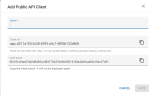
- Enter a Name for the new API Client.
- Provide a Client ID. The Client ID must start with "app_" and may contain letters, numbers, periods, dashes, and underscores.
- Copy the Client Secret by selecting the Copy to Clipboard button. The Client Secret will not be shown again.
- When the details have been defined for the API Client, click Save.
- Repeat these steps to add other API Clients.

Related Topics