
Add New Outgoing Delivery
In Media Manager, deliveries are anything you send or receive. Deliveries of all types contain media. Outgoing deliveries are any case-related media you send (typically to your clients or opposing counsel). Media Manager allows you to manage and track your deliveries and offers flexibility in workflow to accommodate different processing needs and scenarios.
To add a new outgoing delivery (shipment or production of case-related media):
-
Prepare for the delivery by ensuring you know your organization’s conventions for delivery details and have all needed information. Check with your administrator if you have any questions.
-
In Media Manager, click the Deliveries tab, if needed.
-
Click Create and select Outgoing from the drop-down list.
-
Enter or select needed delivery details as listed in the following table.
-
Shipment: Delivered by a standard shipping company.
-
Email: Sent by email.
-
FTP: Deposited on an FTP (File Transfer Protocol) site.
-
Electronic Delivery: An electronic method other than email or FTP.
-
Physical Delivery: Delivered in person by a method other than the listed shipping companies.
-
Click in the field and complete step 2 or 3 to select a recipient (a contact defined by your administrator) from the list.
-
In the list, click the recipient's name.
For long lists, enter any part of the name in the Find box to limit the list to names with the entered character(s).
-
Click the needed name.
-
Click X to clear the field and enter something different.
-
-
If the needed name does not exist:
-
Click Add New Ship To and enter needed details. A name is required; other details are optional.
-
Click Save. The new recipient is selected in your New Delivery form (and also added to the Administration Contacts list).
-
-
Fed Ex: FedEx Corporation
-
USPS: United States Postal Service
-
UPS: United Parcel Service, Inc.
-
Other: Any other delivery company or person.
See below to view field descriptions:
|
|
Note: Delivery Name is required (as indicated by*); all other entries are optional. Not all items apply to all delivery methods – for example, an email delivery would not include a tracking number. |

|
Field |
Description |
|
Delivery Name* |
Enter a name for the delivery. Consider naming conventions to ensure deliveries are easy to identify and find. |
|
Delivery Method |
Select the means of delivery from available options: |
|
Ship To |
To select recipient: |
|
Carrier |
Select the applicable delivery service: |
|
Shipped On / Arrived On |
Enter the date on which the media were shipped/received, using a numeric-only format (for example, 10/08/2015 or 10-8-15). Or, click the calendar icon and select the date. |
|
Tracking Number |
As applicable, enter the carrier’s package tracking number. |
|
External ID |
If your firm has another delivery tracking system, enter that system’s identification here. |
|
Description/Notes |
Enter any pertinent details about the delivery. |
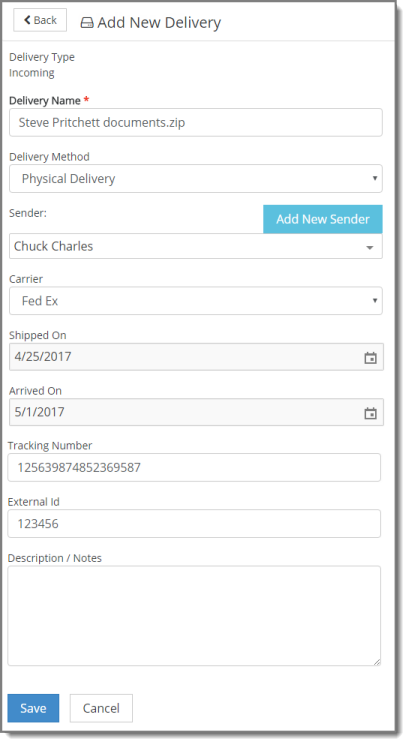
- When
finished, do one of the following:
- Click Save to complete the definition of the delivery.
- Click Save and New to complete the definition and define additional deliveries. The delivery type is Outgoing.
-
After a delivery has been saved, optionally do one of the following:
-
Click < Back to return to the New Delivery form/create a new delivery. The delivery type will be the same as the delivery you just created (Outgoing).
-
Modify delivery details.
-
Related Topics