Define a Concept Search
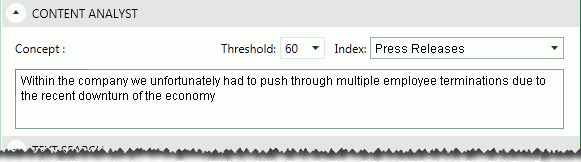
If IPRO Eclipse Analytics has been implemented at your firm, the Advanced Search tab will include the Content Analyst search section as shown in the following figure. A concept search returns documents containing information that is conceptually similar to your search query, that is, it looks for ideas rather than specific terms or phrases.
Effective Searching
For a concept search to be effective:
-
The search phrase should be written in a natural style comparable to the style of the documents being searched. For example, if the style of most case documents is appropriate for entry-level non-technical employees, then the query should not be written at a level appropriate for advanced IT professionals.
-
The search phrase should include text that will adequately describe the concept(s) of interest. A sentence, paragraph, or even the contents of an entire document may be entered. Entering one or just a few words is not as likely to return the most relevant results.
-
The search phrase should focus on only the concepts of interest. For example, the query shown in the previous figure will find documents regarding employee terminations as related to the economy. If terminations alone are of interest (regardless of reason), then Within the company we unfortunately had to push through multiple employee terminations might be a more effective search.
-
Effective concept searching often requires that you conduct multiple searches, analyzing results and adjusting your search entry accordingly.
Procedure
To define a concept search:
-
Begin with the "Basic Advanced Search Procedure".
-
If Concept Analyst section is not visible in the Advanced Search tab, click the corresponding
 .
. -
Complete this section of the Advanced Search tab as described in the following table.
component
Description
Concept field
Enter your query into the Concept field. The query can be any size, but a more fully described concept will usually yield better results than just one or two terms.
Threshold
Select a relevancy threshold to be used for the search. The threshold expands or narrows the evaluation for conceptually matching documents. Note:
-
A typical value is 50.
-
A higher number represents higher precision but less recall.
-
A lower number represents lower precision but higher recall.
Index
Select the search index that has been defined for the concept of interest. Your IPRO Eclipse administrator must configure concept search indexes. Contact your administrator for details about your concept search indexes.
-
-
Complete your advanced search definition as needed; see the other procedures in this section. When finished, go to "Run and/or save a search."