Set Up the Relationship Panel to Display Near-Duplicates (Analytics)
The IPRO Eclipse near-duplicates component, based on IPRO Analytics textual processing, identifies textual near-duplicate groups in item text. Textual near-duplicates are items in which most of the text appears in other items in the group and in the same order.
The metadata of the items identified as part of a near-duplicate group will be updated with a group ID to identify the near-duplicate group to which the items belong.
|
|
Note: Near-duplicate detection will typically be configured by you case administrator. For more information, contact your case administrator or see Configure Near-Duplicate Detection in IPRO Analytics in the Eclipse Administration section. |

To learn more about near-duplicate detection, watch the Near Duplicates video.

 Click
here to watch the Near Duplicates video
Click
here to watch the Near Duplicates video
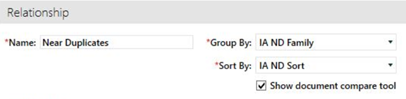
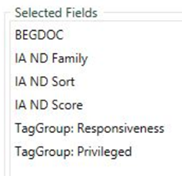
After you have configured near duplicate detection in Eclipse Administration and you have set up the relationship panel to view near duplicates, you can:
- Set up batch review by near duplicate group to allow for documents in the same ND group to be reviewed by one reviewer all at the same time, providing for faster, more consistent review decisions. For more information, see Create Near Duplicate Batches for Review (Analytics).
- Use Email Threads to review emails and their attachments, and Near Duplicate technology to review the remaining loose documents. For more information, see Create Email Thread with Near Duplicate Batches for Review (Analytics)
Related Topics