Create Near Duplicate Batches for Review (Analytics)
Review all documents in every near duplicate group by grouping all documents into the same batch. First, in Eclipse Web, you must create and save a search that identifies near duplicates. Once this is completed, in Case Administration, you create the review pass and select the reference your saved search as the search results to use for the batch creation.
Create and Save a Near Duplicate Batches Search
-
In Eclipse Web, navigate to Advanced Search and select:
-
Create a new search entitled Near Duplicate Batches.
-
Under the Include drop-down, select Family to ensure that family relationships will be maintained.

-
-
The criteria of the search should identify all families that received a Near Duplicate value. This can be accomplished by searching for any documents where the IA ND Family field contains a value.
- Save the search.
Create Review Pass Batches Using Near Duplicate Search
-
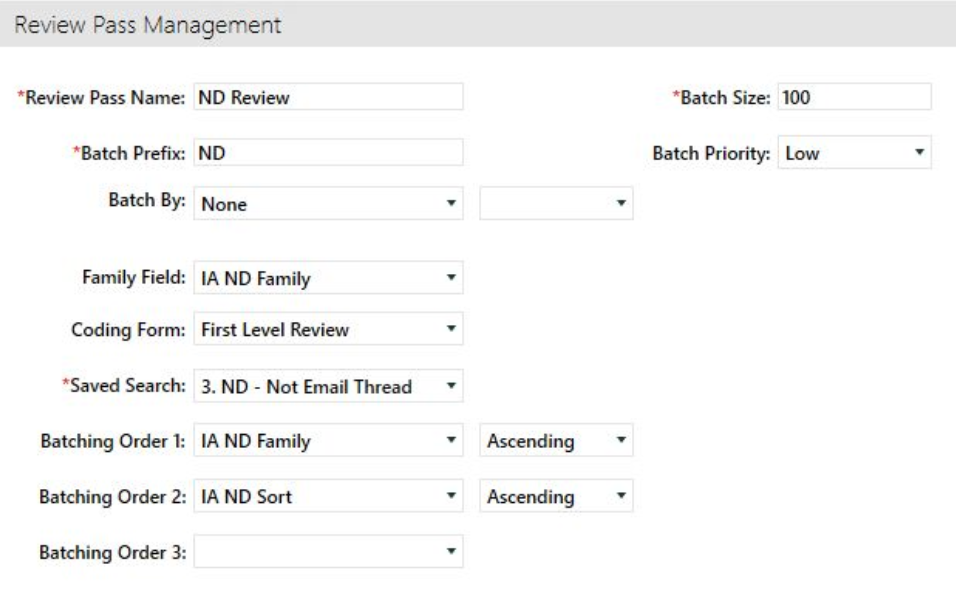
In Case Administration select Review Pass Management and the Plus button.
- Name the Review Pass and enter a Batch Prefix.
-
Enter the Batch Size of your choice.
- Set the Family Field to IA ND Family to ensure all Near Duplicates are kept together.
- Choose the Saved Search you previously created, titled Near Duplicate Batches.
- Sort your Review Pass by IA ND Sort ascending
- Select Save
-
Select Create Batches in the bottom right corner.
Related Topics
Configure Near-Duplicate Detection in IPRO Analytics
Set Up the Relationship Panel to Display Near-Duplicates (Analytics)
Create Email Thread with Near Duplicate Batches for Review (Analytics)