Evaluate Document Clusters
The clustering function groups and sorts documents based on content that is conceptually similar as defined by a conceptual search index. Clusters are named automatically, based on an analysis of the common concepts found within the documents.
Clustering is automatic and based on the entire data set that has been defined by your administrator. The data set may be the entire case or a saved search.
Clustering can be useful if little is known about the data set. Because it clusters all text, it can give you an overview of the content and help you identify data that is both relevant and irrelevant to your review activities.
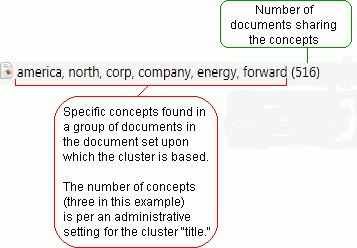
In the following example, primary group, Cluster 01, includes clusters and sub-clusters indicating granularity in the concepts that have been discovered. Each cluster/sub-cluster includes the number of documents.

Evaluating Clusters
If your administrator has configured clusters for the case you are reviewing, evaluate document clusters as follows:
-
If your administrator has provided instructions for working with clusters, read those instructions. Contact your administrator if you have any questions.
-
In the left pane, click Analytics.
-
Expand the Clusters tree and locate a cluster/sub-cluster that relates to your review. Documents within a particular cluster are identified by IPRO Eclipse Analytics based on case content and the concepts and patterns found by its algorithm-based analysis. Clusters are listed by number of documents in each cluster.
-
Evaluate clusters and details in the list. For example:
-
Click a cluster/sub-cluster of interest and review documents in the resulting Search Results tab.
-
Click the Concept Wheel tab to view a visual representation of cluster details. See Use the Concept Wheel for details.
-
Repeat this procedure to evaluate other clusters.