IM System Events Search
For MS Teams and Slack Enterprise, System Messages are automatically generated for certain events. System Messages are also called System Events.
You can search System Events when performing an IM Search or Advanced Search.
To learn about performing a System Events search, see steps below.
How to perform a System Events search
- In the Location view, select the Teams or Slack repositories that you want to search.

- In the Document view, click Search > IM Search. You can perform a search in five tabs: Post, System Events, Files, Audit, and Tags. Open the System Events tab.
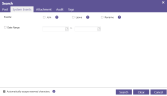
- Click Clear to remove any parameters set in a previous search.
- Choose one of the available criteria:
- Select Join to search for System Events where
- Select Leave to search for System Events where
- Select Remain to search for System Events where Teams and Slack channels and chats are renamed, and Teams are renamed.
- Select Join to search for System Events where
- (Optional) Select a Data range to limit the scope of your search.
- Click Search.
The Search dialog box closes and your results (if any) are displayed. - If needed, run another search. You can add criteria to the Post, Files, Audit, or Tags tabs to narrow the search—see IM Searches.

