Transcripts
About Transcripts
Your administrator may include transcripts from such events as depositions, hearings, or cases, with the case you are reviewing. If you have the appropriate permission, you can view, search, and annotate transcripts as part of your review. In addition, various transcript reports can be generated.
Permissions Required
Access to transcripts is governed by a specific permission. Contact your administrator if you have questions about working with transcripts.
Getting Started
Familiarize yourself with components of the Transcripts tab, shown in the following figure and discussed in the following table.

|
Component |
Description |
|
Transcripts |
Locate and select needed transcripts from the transcripts list. Transcripts are organized in folders according to the types defined by your administrator. |
|
Annotations |
Open the Annotations pane, which lists issues and includes an area for reviewer’s notes and navigation bar for highlighted content. |
|
Search |
Access the annotation search tool and view/select transcript search results. |
|
WordWheel |
Use this index of words and numbers to locate specific content in the open transcript. |
|
Reporting |
Generate a report on transcript issues, notes, quick marks, or all annotations. |
|
Transcript content pane |
The body of the transcript display in the right pane. Scroll to see all content. |
|
Transcript toolbar |
Use as described in the following figure. |
|
|
|
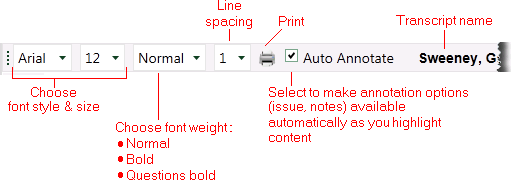
Transcript Tab Toolbar
|
button |
Description |
|
|
Select font style, size, and weight (including bolding of just questions). |
|
|
Select line spacing. |
|
|
Print document. |
|
|
Zoom (for some file types). |
|
|
Select to make Annotations palette activate automatically as you work. |
|
|
Fit to width (for some file types and layouts). |
|
File Name |
Transcript name used in IPRO Eclipse. |
|
|
Select type of layout: Draft, Normal, or Preview (for some file types). |
|
|
Find/navigate to a term in the current document. |
|
|
Native and display search results and/or persistent hightlights. |