Opening a Transcript
To open a transcript:
-
Log in to IPRO Eclipse and open the needed case or batch.
-
Access the Document Details pane and click the Transcripts tab.
-
If the transcript list is not visible, click Transcripts in the left pane of the tab.
-
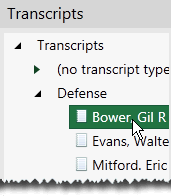
Open the needed folder and click the transcript of interest as shown in this figure.
-
The transcript opens on the right side of the tab.
-
As needed:
-
Undock and/or resize the tab.
-
Select a preferred font characteristics and/or line spacing from the Transcript toolbar.
-
Scroll in the transcript to view its contents.
-