Create Full Email Thread Batches for Review (IPRO Analytics)
For email threading, one way of build batches is using full thread batch review. In this scenario, you create batches such that a single reviewer can review all documents in every thread by grouping all emails of a thread into the same batch. Allowing for all documents in the same email thread to be reviewed by one reviewer, provides for faster, more consistent review decisions.
-
Create a new Advanced Search called Email Thread Batches. Include Families on the search by ensuring the option to Include Family is selected from the drop-down.
-
The criteria of the search should identify all families that received an Email Thread value. This can be accomplished by searching for any documents where the IA Email Set ID field contains a value.
-
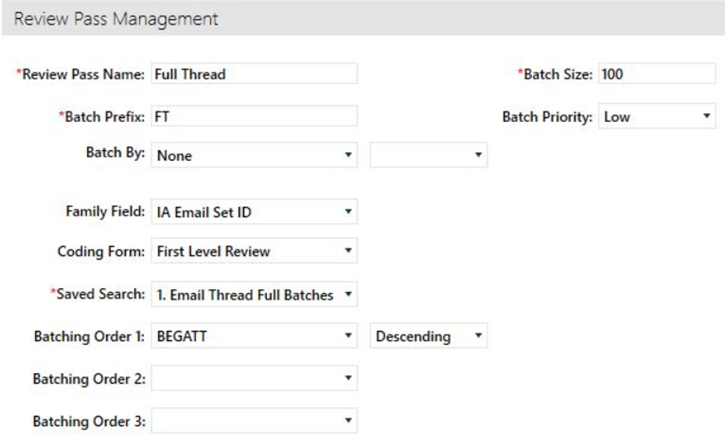
Create a new Review Pass and identify your Advanced Search for the documents to be batched:
-
Set Batching Order 1: in your Review Pass to BEGATT descending
-
Choose a batch size to fit your needs.
-
Identify a batch prefix.
-
Set the family field to IA Email Set ID to ensure all families and threads are kept together.
- Sort the Review Pass by IA Email Sort descending.
-
Save and Create Batches.
-


Related Topics
Create Email Thread with Near Duplicate Batches for Review (Analytics)
Create Inclusive Email Thread Batches for Review (IPRO Analytics)
Set Up the Relationship Panel to Display Email Threads (Analytics)