Build Coding Forms
Understand Coding Forms
About Coding Forms
By default, the Record View pane in Eclipse displays four basic fields, those defined as BEGDOC, ENDDOC, BEGATTACH, and ENDATTACH. Hundreds of fields may be defined in your cases, while only a few are needed for users to perform a particular task.
Eclipse allows you to create various field sets (“coding forms”) so that the fields listed on the Record View pane meet case users’ needs and allow them to work as efficiently as possible. Coding forms also dictate which tags appear in the Doc/Page Tags tabs in Eclipse.
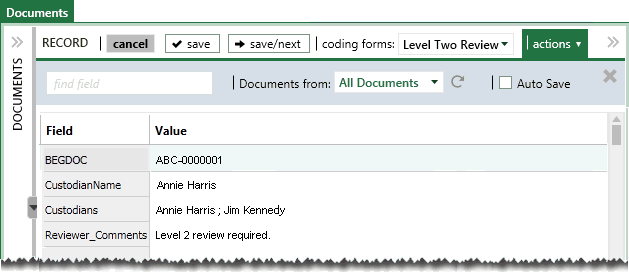
Eclipse also allows you to define coding forms for specific users. In the following example, the “Level Two Review” form includes just four fields.

 Click
here to watch the Creating Coding Form video
Click
here to watch the Creating Coding Form video
Related pages:
Coding Forms and the Case Table
For cases created in Eclipse 2013.3.0 or later, when users first log in to a case in Eclipse, the fields defined by the default coding form comprise the columns in the case table (the Documents or related tab). (If the coding form does not include fields, the BEGDOC field displays.) For older cases, the fields that display are as defined by the administrator or user.
Users with the needed permission can show and organize the columns (fields) in the case table to meet their own needs. After the case is initially accessed, there is no relationship between a coding form and the columns displayed in the case table.
Planning
As with many Eclipse tasks, proper planning will help ensure that the coding forms you define match needed case review activities.
-
Names: If several coding forms will be available for users, give some consideration to naming conventions.
-
Fields and tags: Identify the sets of fields and tags that will best serve case review. Also determine the best order for these fields and/or tags.
-
Rules: Basic “if-then” rules can be defined regarding tags, tag groups, fields, and/or review status to enforce record editing and/or tagging requirements. Determine whether rules will be defined.
-
Security: Determine whether forms should be restricted to certain user groups.
Also consider the information users will need in order to properly use coding forms and create appropriate case instructions.