Define Your Eclipse Administrative Team
If you have not yet identified the employees who will serve as the top Eclipse administrative team, it is recommended that you do so now. These are users who should belong to the Super Admin group and have access to all functions in Eclipse Administration and Eclipse. Next, identify users who should have limited administrative responsibilities, such as case administrators, and define a user group for those administrators. Depending on the size of your organization, you will have one or more Eclipse administrators and one or more case administrators.
With your administrative team in place, all aspects of Eclipse implementation can be completed and your organization can start using Eclipse for all documentation evaluation and preparation required for the discovery process.
See Manage Eclipse Security to define administrators, reviewers, and users who will be involved with Eclipse.
This page contains the following content:
For All Administrators
Administrators who are experienced in the processing of litigation documentation and those who have good standards and processes in place, will find an easy transition to Eclipse.
If you are a new member of the Super Admin group, after reviewing this section:
-
Log in to Eclipse and take a tour of the administrative aspects of Eclipse:
-
Log in to Eclipse on your site’s Eclipse website.
-
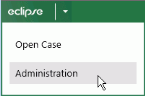
Click the Eclipse button in the upper left corner of the site and select Administration as shown in this figure. Only members of the Super Admin group have access to this aspect of Eclipse.
-
If the System Administration pane is collapsed, click the pane title to expand it.
-
Review the various administration functions.
-
-
If a case has already been created:
-
Open the case in Eclipse by selecting Open Case on the Eclipse button menu.
-
Click Case Administration in the Case View (left) pane of Eclipse.
-
Review the administrative aspects of the case.
-
-
Refer to this document for procedure details.

For New Administrators
Those who are new to litigation support software will also find Eclipse Administration easy to use.
As with many endeavors, however, planning will help ensure an accurate, consistent, implementation of Eclipse.
For larger organizations, it may be worthwhile to implement specific standards for case management in Eclipse.